When does starting from a URL help?
Start here when you have an accessible reference page and want a frontend starting point or design rules for a coding assistant. Typical uses include landing-page prototypes, studying responsive layouts, and carrying a visual style into an existing project. Add your own content, behavior, and data after generation.
Screenshot, public URL, or existing source?
- You only have a screenshot
- Use a tool that accepts images. A screenshot gives visual context for one viewport; other widths, hover states, and behavior need further instructions. CloneAny does not accept screenshot input.
- You have a public webpage URL
- CloneAny produces a Tailwind CSS v4 project, static preview, and DESIGN.md from the current page. This fits an existing webpage reference; the source backend and login behavior are not copied.
- You already have the project source
- Work in that project and add DESIGN.md when useful. You do not need to clone your existing project again.
See a real generated project
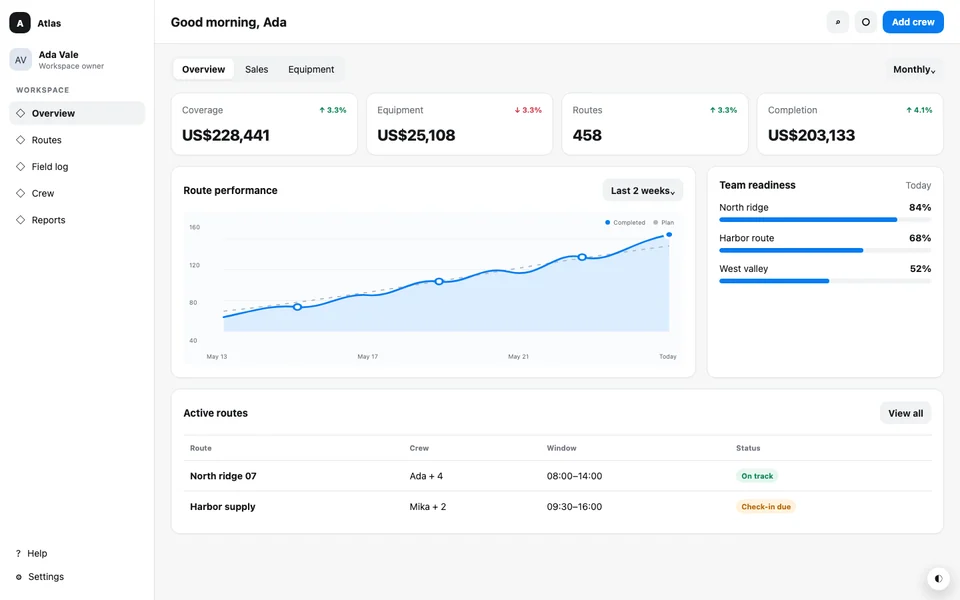
A dense dispatch dashboard with status cards, an operational table, restrained color roles, and compact responsive navigation.
Steps
Choose a public page
Paste a public page URL you own or are allowed to reuse and start cloning for free.
Review the generated preview
CloneAny reads the page in a browser and builds a static frontend project. Check the result at desktop and phone widths before downloading.
Download and continue building
Download the starter project and DESIGN.md. Open the source in your coding tool, run the included build instructions, and describe the content and behavior you want to change.
Why screenshot recreation stalls
A screenshot records pixels, not the rules that produced them. Two columns might come from Grid, Flexbox, or fixed positioning. A mobile layout, hover state, CSS variable, or container query may not appear at all. The first result can look close while still requiring hours of small corrections.
What CloneAny recovers
The source page remains the evidence. CloneAny applies deterministic capture and compilation instead of asking a model to guess the page from pixels.
- Clean HTML and Tailwind CSS v4 source for continued development
- Responsive rules and localized page assets from the live source
- A same-capture DESIGN.md for Cursor, Claude Code, or Codex
When a screenshot is still enough
Use a screenshot when you only need a rough concept, the original page is not publicly accessible, or you want a new design inspired by a composition rather than a faithful implementation. Use URL capture when responsive behavior, reusable styling, and a close development baseline matter.
A practical AI coding handoff
Download the Tailwind project, keep DESIGN.md beside it, and ask your coding tool to adapt the clone to your product content and behavior. Point the tool to specific sections of DESIGN.md when adding new screens so it can reuse the captured typography, color, spacing, radius, and component patterns.
Example
A screenshot can show a two-column desktop layout, but it cannot tell your coding tool whether the mobile layout follows a viewport breakpoint or a container query, or how navigation states change. A live-page capture can preserve those authored rules when they are available in the source CSS.
Bring the reference into your project
Start with a public webpage, get its frontend project and design guide, then continue with your own requirements.
Try a public webpage URL