When does starting from a URL help?
Start here when you have an accessible reference page and want a frontend starting point or design rules for a coding assistant. Typical uses include landing-page prototypes, studying responsive layouts, and carrying a visual style into an existing project. Add your own content, behavior, and data after generation.
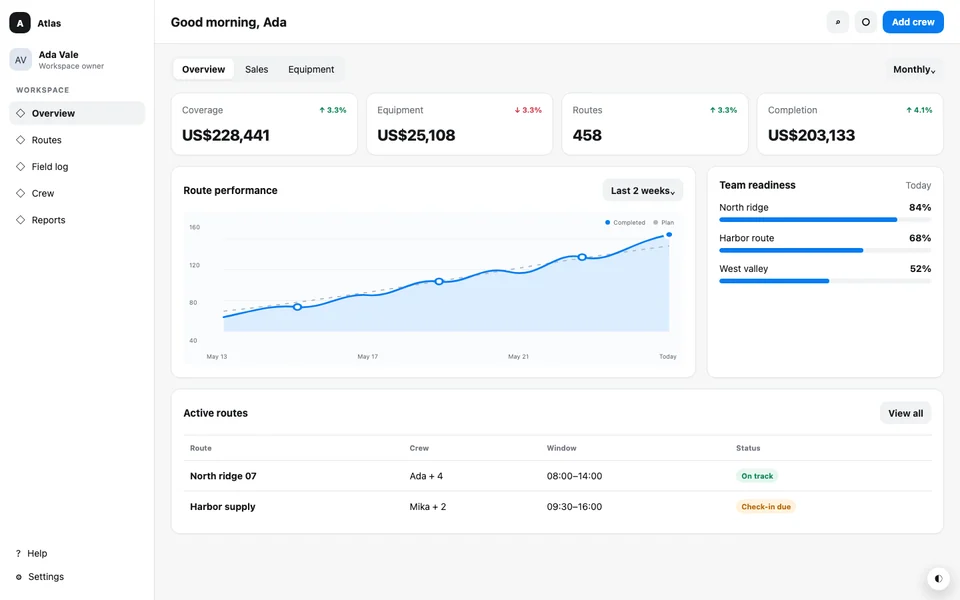
See a real generated project
A dense dispatch dashboard with status cards, an operational table, restrained color roles, and compact responsive navigation.
Steps
Choose a public page
Paste a public page URL you own or are allowed to reuse and start cloning for free.
Review the generated preview
CloneAny reads the page in a browser and builds a static frontend project. Check the result at desktop and phone widths before downloading.
Download and continue building
Download the starter project and DESIGN.md. Open the source in your coding tool, run the included build instructions, and describe the content and behavior you want to change.
What you receive
The download contains clean HTML, Tailwind CSS v4 source, controlled CSS where the source needs it, localized assets, and a reproducible static build. DESIGN.md comes from the same public-page capture, so the style guide describes the code you received.
- Source files you can edit in a normal coding workflow
- A static preview built from the same source
- A DESIGN.md with observed visual facts and patterns
How the workflow works
Submit a page you are allowed to process, wait for the capture and compilation to finish, inspect the static preview, then download the project. Keep DESIGN.md in the repository and tell your coding agent what content and behavior you want to change.
Why a live URL carries more information
A screenshot records one set of pixels. A public webpage can expose responsive CSS, variables, layout relationships, fonts, assets, and visible interaction states. CloneAny uses that source evidence instead of asking a model to invent the missing rules.
Scope and limits
CloneAny processes the current page at one public HTTP or HTTPS URL. It does not copy an entire site, backend logic, private APIs, authenticated content, or every dynamic interaction. Review content rights, accessibility, security, and browser behavior before publishing your result.
Example
Example handoff: download the project, open it in your repository, keep DESIGN.md at the root, and ask: “Read DESIGN.md and preserve its typography, spacing, color roles, and responsive behavior while replacing the homepage copy and product sections.”
Bring the reference into your project
Start with a public webpage, get its frontend project and design guide, then continue with your own requirements.
Convert a public webpage