DESIGN.md generator from a website URL
Give your AI coding tool a concrete design reference. Turn a public webpage into a DESIGN.md file describing its colors, typography, spacing, and layout, with a matching Tailwind project and static preview.
Public pages only. Generate and download for free.
What is DESIGN.md?
DESIGN.md is a Markdown file that records the visual rules of an interface. It gives a developer or coding agent a reference for decisions such as heading sizes, surface colors, spacing, and component appearance.
A request like “make the new page match our site” leaves many choices open. A design reference makes those choices explicit. You still describe the content and behavior you need, and review the finished UI.
When a website design guide helps
Start from an existing page when you want to carry its visual language into the next piece of work.
- Extend your own product: give a new settings page or dashboard a reference for the typography, spacing, and components already in use.
- Work with an AI coding tool: supply concrete design rules instead of repeatedly describing how each screen should look.
- Hand off an existing website: put a readable design reference beside the source so another developer can inspect both.
- Explore a permitted reference: study a layout or component pattern, then make deliberate choices for your own content and brand.
How to generate DESIGN.md from a website
1. Choose a public webpage
Paste the URL of a page you own or have permission to reuse. Choose the page with the design you want to reference. Start for free without signing up.
2. Generate the design guide
CloneAny reads the page in a browser and organizes the design information it can observe into DESIGN.md. The same page capture also produces a Tailwind CSS v4 project and static preview, so you can inspect the reference alongside the result.
3. Download and put it to work
Open the completed task to review the preview and DESIGN.md. Download the guide for an existing project, or download the starter project to continue from the captured page. Ask your coding tool to read the guide before making UI changes.
See the page and the design file together
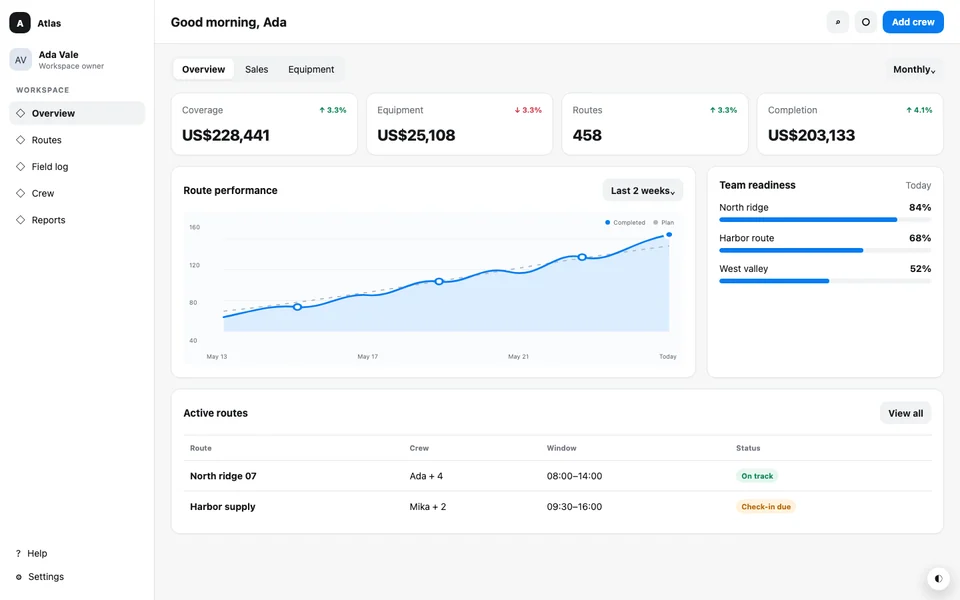
Atlas Dispatch is a CloneAny-owned sample dashboard. Open the source, generated preview, and full guide to check how the documented design relates to the page. The excerpt below is taken directly from its downloadable file.
What the generated file includes
The guide describes design information found on the selected page. The exact contents depend on what that page exposes; a single page cannot document components that only exist elsewhere.
- Colors: observed text, surface, action, and status colors, with theme differences where available.
- Typography: font families, heading and body sizes, weights, and line heights.
- Layout and spacing: page structure, gaps, padding, and observed responsive changes.
- Components and details: recurring interface patterns, borders, corner radii, shadows, and observed states.
DESIGN.md · typography excerpt
typography:
  body:
    fontFamily: "Inter, ui-sans-serif, system-ui, -apple-system, BlinkMacSystemFont, \"Segoe UI\", sans-serif"
    fontSize: "14px"
  display:
    fontFamily: "Inter, ui-sans-serif, system-ui, -apple-system, BlinkMacSystemFont, \"Segoe UI\", sans-serif"
    fontSize: "19px"
  h2:
    fontFamily: "Inter, ui-sans-serif, system-ui, -apple-system, BlinkMacSystemFont, \"Segoe UI\", sans-serif"
    fontSize: "15px"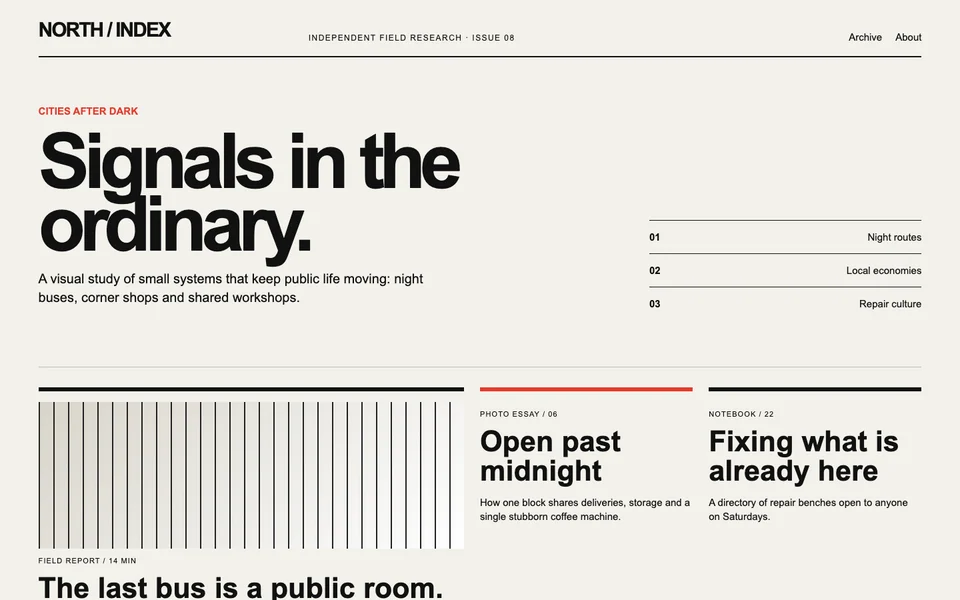
Your reference can be more than a dashboard
A publication, portfolio, and dashboard make different layout choices. This editorial example uses a different grid and type hierarchy. Compare its generated guide with Atlas Dispatch to see how the reference changes with the source page.
Use DESIGN.md with your coding tool
Add the downloaded file to your project and explicitly ask the tool to read it. The filename alone does not guarantee that a tool loads it. Use the tool-specific guides below for the setup.
Describe the page you want to build, its content, and the interactions it needs. Keep a copy of the original guide before editing. When the design changes, update the working guide to match the finished interface and test it at desktop and phone widths.
A starting prompt
Read DESIGN.md before editing. Add a settings page using the documented typography, colors, spacing, and component patterns. Keep a copy of the original guide. Explain any new design choices the guide does not cover, then check the result on desktop and mobile.
What to know before you generate
CloneAny works from the current public HTTP(S) page. It does not recursively copy a whole website or reproduce its backend, private data, or source scripts. Content behind a login and inaccessible embedded content are outside that reference.
The file is a starting reference, not a guarantee that an AI tool will reproduce the design exactly. Review missing states and components before treating it as a broader design system. You are responsible for permission to reuse the source content, fonts, and assets.
Generate and download DESIGN.md for free, together with the Tailwind project from the same page. You can inspect the public example and its full DESIGN.md before starting.
Continue in your coding workflow
Start with the page you want to build on
Bring its visual rules into your next task. Paste a public URL above to generate the guide and matching project.
Generate your DESIGN.mdLast updated: