Quick start: use your own design reference
Use an existing DESIGN.md, or generate one from a public webpage and bring it into your current project. A design reference complements your feature requirements and visual checks.
Keep the design reference with your code
Place DESIGN.md beside the frontend code it describes. Keep a copy before editing. You can use a guide you already have; the worked example below is optional.
Reference it from CLAUDE.md
Add this to the project CLAUDE.md without replacing existing instructions. The @ import includes the design file. Use /memory to check the instructions loaded for your current directory.
@DESIGN.md

Use the design reference for UI work. Keep engineering rules and product requirements in their own instructions. Verify changed screens.
Give Claude a concrete task
Read DESIGN.md and inspect the existing UI before editing. Add a settings page using the documented design rules. Explain any missing design decisions. Build and check the page on desktop and mobile.
Optional worked example: dashboard to scheduling app
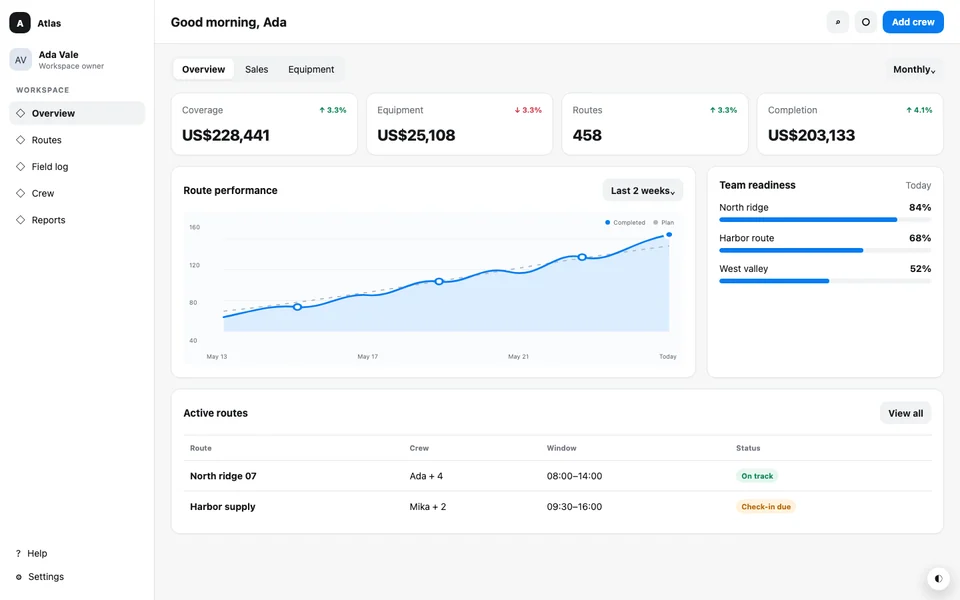
A dense dispatch dashboard with status cards, an operational table, restrained color roles, and compact responsive navigation.
Steps
Start with one working download
Open Atlas Dispatch in Gallery and compare its source, clone, and DESIGN.md. Create your own clone of that public source, download the starter project, and extract it into a new folder. Use Node.js 24 to install and preview the unmodified files before asking the tool to make changes.
Keep the captured reference
Copy DESIGN.md to REFERENCE_DESIGN.md before the first edit. Keep that copy unchanged. The final DESIGN.md should describe the new site, while the reference lets you check which captured rules were kept.
Import the reference in CLAUDE.md
Add the short CLAUDE.md example below at the project root. Claude Code reads CLAUDE.md and can import another file with @ followed by its path. If this folder already has instructions, add the reference to them instead of replacing the file.
Check loaded context, then send the brief
Start Claude Code from the extracted folder. Use /memory to inspect the loaded instructions, then send the scheduling brief. Ask it to read the source entry and build scripts before it edits the dashboard.
Run the result and test the change
Run the build and preview again. Add a shift, change both filters, and use the keyboard to reach and close controls. Check 390px, 768px, and 1440px widths. If the input has working themes, switch them and reload. Compare the preserved reference with the download and read the final DESIGN.md against the actual page.
Files and commands
CLAUDE.md
@REFERENCE_DESIGN.md

Keep REFERENCE_DESIGN.md unchanged. Use it when editing the interface. Update DESIGN.md to describe the completed site. Run npm run build and verify the preview at 390px, 768px, and 1440px.
The same project brief
Build Shiftline, a weekly scheduling dashboard for teams of 8–20 people. Rebrand the existing Atlas Dispatch dashboard with team availability and coverage summaries, and add a separate Schedule page linked from the navigation with a weekly shift view. The primary action is Add shift: let people add a shift locally and filter by day and team. Keep the captured layout density, typography, spacing, table behavior, and any working themes. Do not add a backend or copy claims from the source. Preserve the captured DESIGN.md byte for byte as REFERENCE_DESIGN.md, then update DESIGN.md to describe Shiftline. Rebuild the project and verify both pages, keyboard operation, no horizontal page overflow at 390px, 768px, and 1440px, and any theme switch after reload.Run the downloaded project
npm ci
npm run build
npm run preview
If Claude reads the wrong instructions
Check /memory and the current working directory. A parent or nested CLAUDE.md can add instructions to the session. Resolve any conflicting design instruction and ask Claude to read the reference again before continuing.
If the build fails, provide the actual command and error. Keep the captured reference unchanged while Claude fixes source files and updates the final guide.
Official tool documentation
Bring the reference into your project
Start with a public webpage, get its frontend project and design guide, then continue with your own requirements.
Generate a design reference